

Keep the conversation on the record
With VISCO Conversations, your team can start a discussion directly on any VISCO record, from a purchase order to a container or sales order. Mention a teammate, attach a document, and see recent changes alongside the discussion.
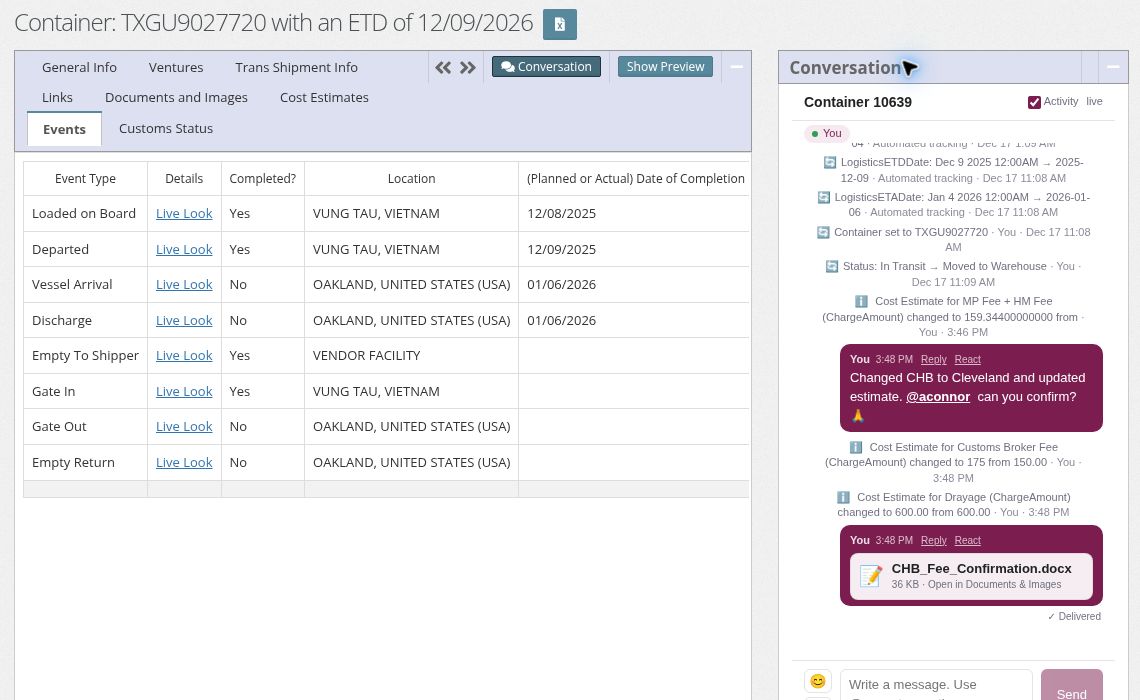
When a broker fee changes
Open the container, check the latest shipment events, and mention the teammate who needs to review the fee. Attach the broker’s confirmation so the next person can see what changed and find the file from the same record.
What you can do in Conversations
- Bring in the right person. Mention a teammate to send an email with a link back to the record.
- Keep the supporting document close. Conversation attachments are available in the record’s Documents and Images tab.
- See what changed. View record activity, including edits and status changes, alongside messages.
- Ask @Viv about the record (Beta). Ask a question such as “What’s the status of this container?” Viv can use the conversation and record details you have permission to see.
See Conversations in VISCO
Walk through a shipment update and see how purchasing, logistics, and sales can pick up the discussion from the same record.